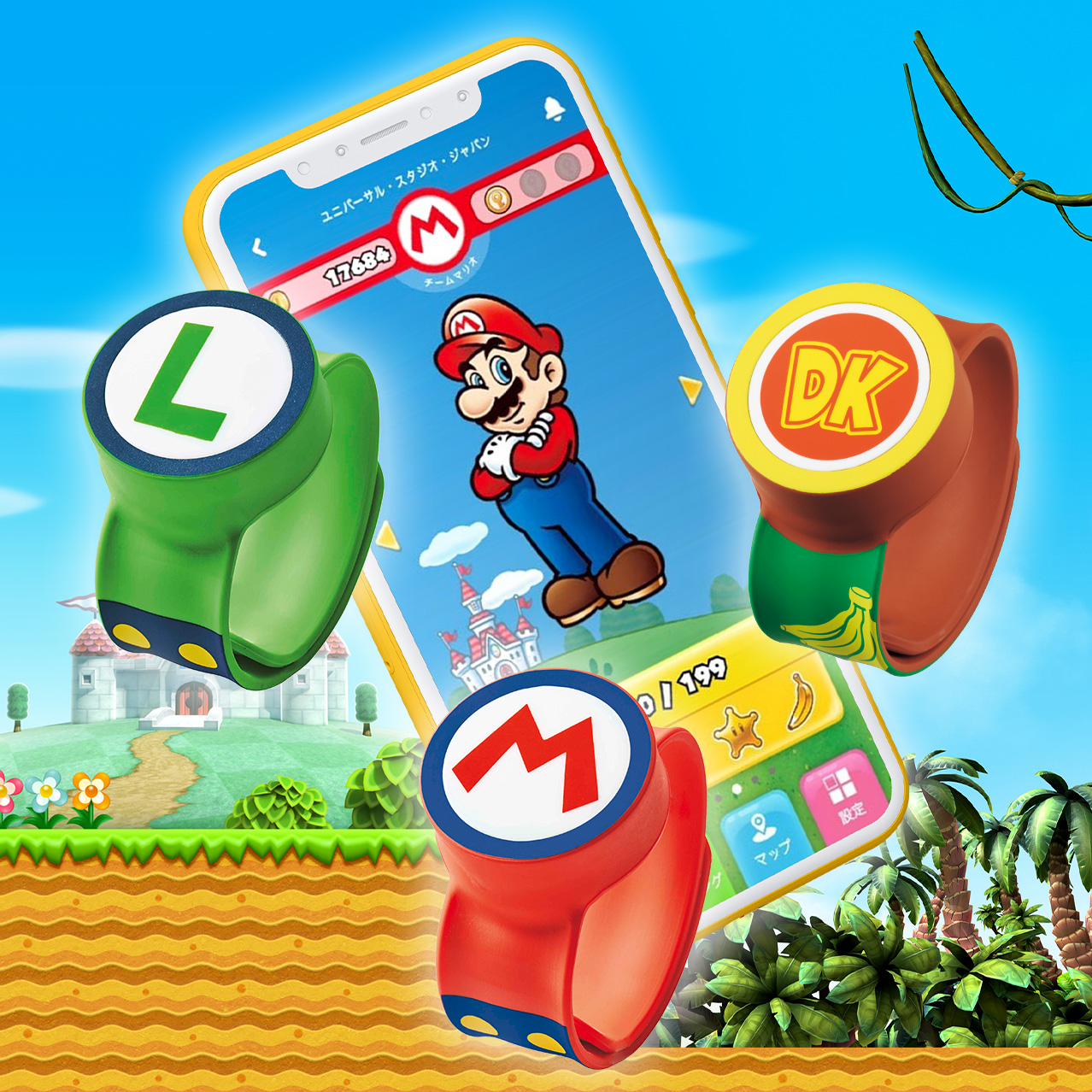
Get the most out of Super Nintendo World™ when you download the official app!

Experience Super Nintendo World™ on a whole other level with the official app!
The official Super Nintendo World™ app is loaded with features! Use it to check your collected coins and stamps, review your play logs, compete with your friends' scores, find activities in the area, change your Power-Up Band information, and more!
* To enhance your Super Nintendo World™ experience with the official app, we offer free Wi-Fi in this area. Try it out!
* The official app is not required to enjoy the area. Check your scores and play details at available checkpoints.
* Power-Up Band will be available for purchase
Notes on Using the Official App
For the safety of yourself and others, we strictly prohibit operating your smartphone while in motion.
Always be aware of your surroundings when using your smartphone. Thank you for your cooperation.
Let's-a go!
Request to relink your SUPER NINTENDO WORLD™ Power-Up Bands™ due to app update
When updating to the new version of the app, previously registered Power-Up Bands will become unlinked.
The Power-Up Band can be relinked in the new app by following the same steps as when linking a Power-Up Band for the first time.
* Please rest assured that all your past data will be there for you once you relink your Power-Up Band.
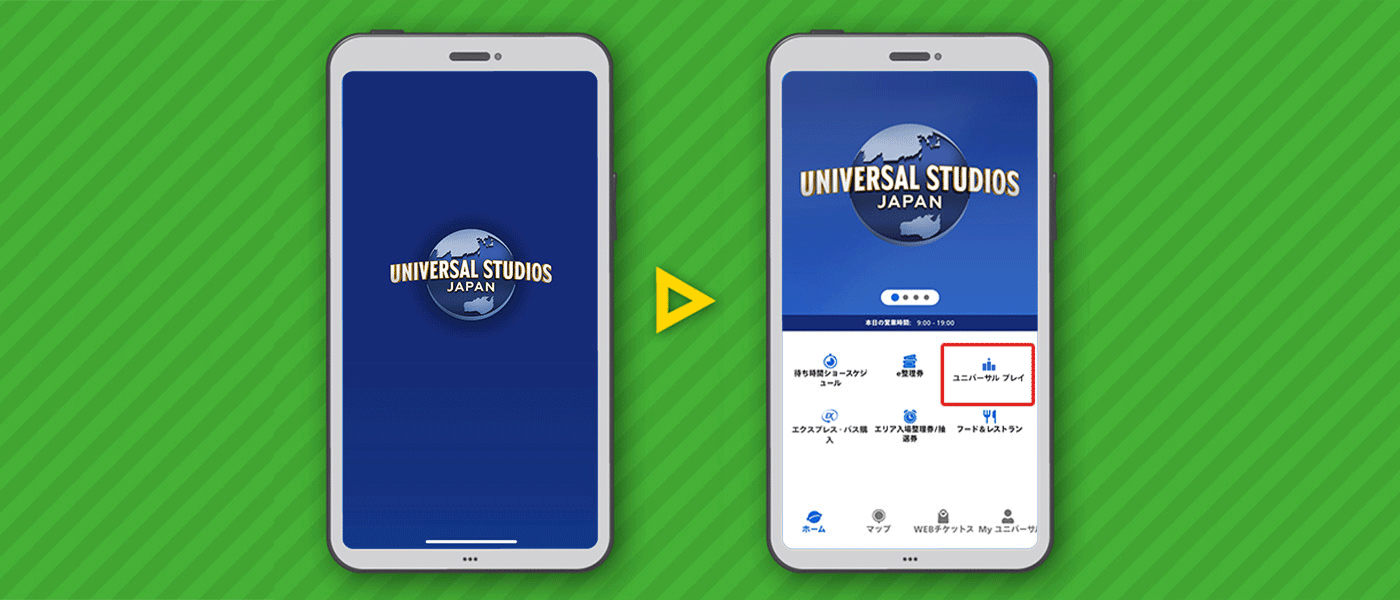
Step 1: Open the official app
Open the official app and select UniversalPlay.
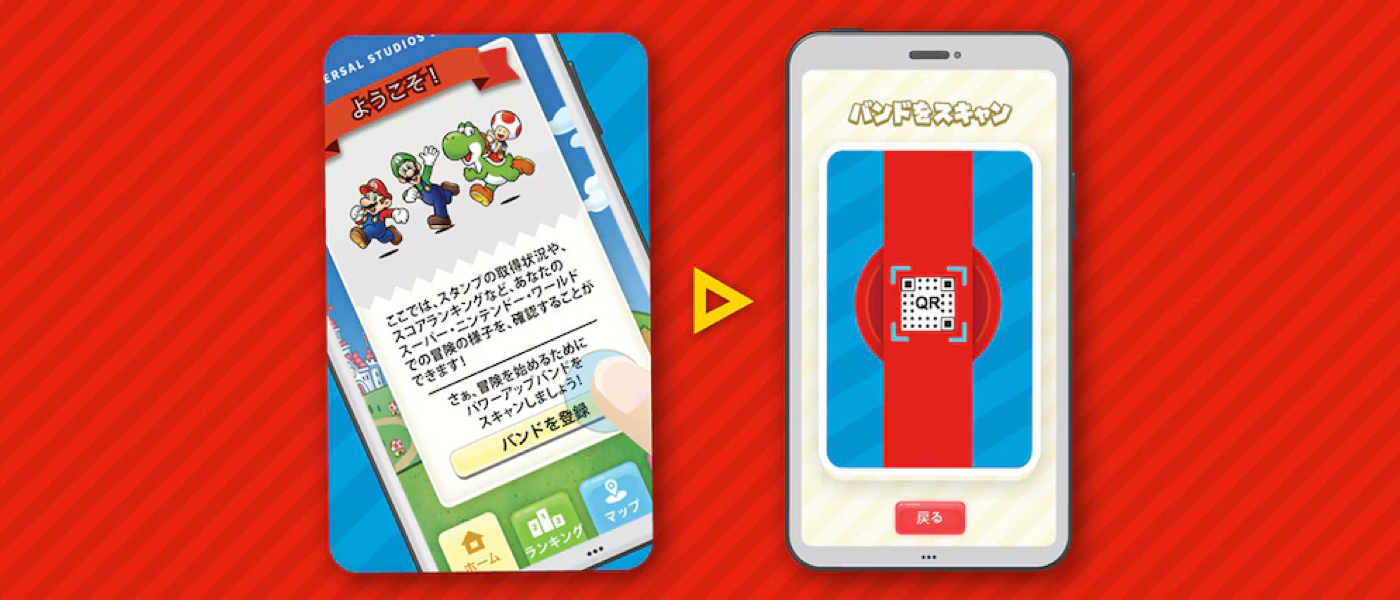
Step 2: Sync your Power-Up Band™
In the app, scan the QR code on the back of your Power-Up Band.
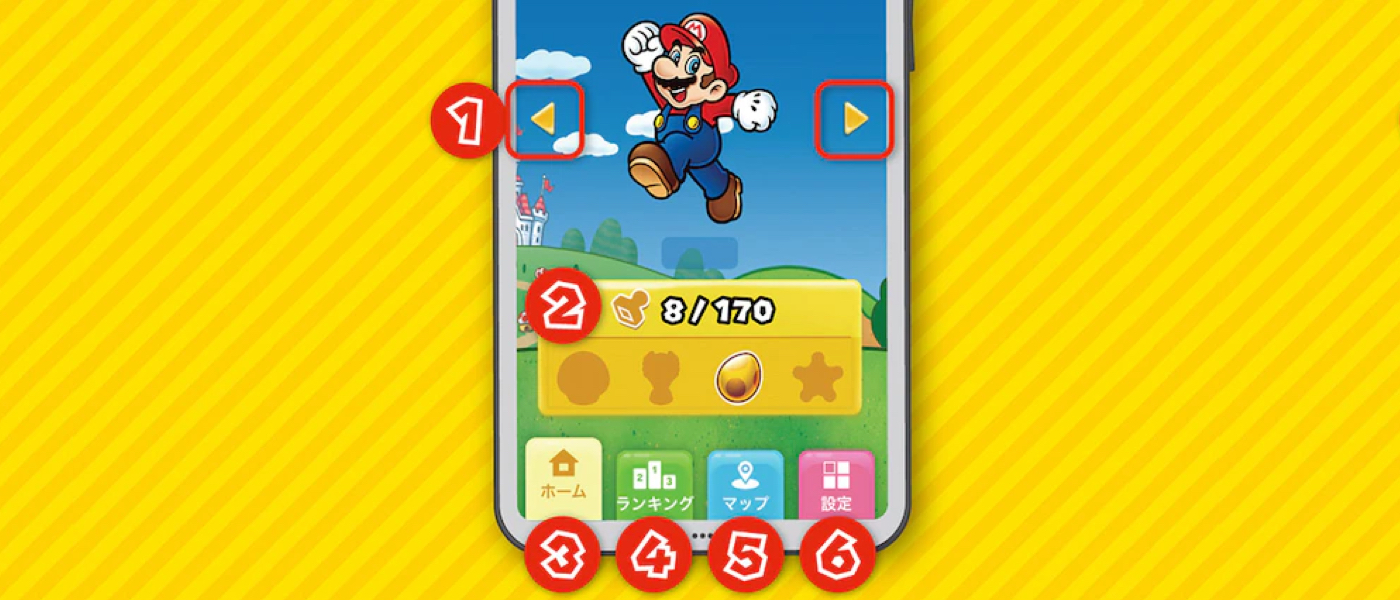
Navigation at a Glance
(1) Switching Power-Up Bands
Tap or swipe to select the Power-Up Band you want to check. Register up to 10 Power-Up Bands under Settings (6) on the official app.
(2) Stamp Collection
Check your stamp collection.
(3) Home
Review coins, keys, and stamps you've collected.
(4) Rankings
Find your scores and see how you rank!
(5) Map
Check the location and type of activities in the area.
(6) Settings
Edit your player profile and register or remove Power-Up Bands.
How to Connect to Free Wi-Fi
(1) While in Super Nintendo World™, open your smartphone's Wi-Fi connection settings. Enable Wi-Fi and select UNIVERSAL from the network list.
(SSID: UNIVERSAL)
(2) Open your browser and click "Connect to the Internet" on the login page.
(3) You'll then be directed to a login confirmation page.
Frequently Asked Questions
What are the minimum system requirements for the app?
Official iPhone application requires iOS17.0 or later.
Official Android application requires Android 9.0 or later.
> The Super Nintendo World™ app functions are not available for some devices. Thank you for your understanding.
Is there an age requirement to use the official app?
To fully enjoy the content, the app is recommended for guests ages 4 and up.
Can guests enjoy Super Nintendo World™ without the mobile app?
The official app is not required to enjoy the area. Check your scores and play details at available checkpoints.
Are there any games solely played in the mobile app?
There is no game content that can only be experienced by the application.
Is there an extra charge for the mobile app?
The official app can be downloaded for free.
* A network connection is required to download and use the app
How can I access the app?
Download the Universal Studios Japan official app to access Super Nintendo World content. We recommend you to install the official app before you visit so that you can enjoy smoothly.
How do I collect coins, stamps and keys?
Collect stamps and coins during gameplay in Super Nintendo World™ attractions. Find keys in the Power-Up Band Key Challenge.
What happens when I collect the keys?
Acquiring the three keys allows you to take on the finale of the Power-Up Band Key Challenge—the Bowser Jr. Shadow Showdown!
Is there a limit to the coins I can collect?
There is no limit on coins.
Where is Information such as scores stored?
Scores and play logs are automatically saved to a cloud.
What is a Power-Up Band?
A Power-Up Band is an item that helps you get more out of your Super Nintendo World experience. Use it to gain access to the Key Challenge and earn coins and digital stamps based on your gameplay. The Power-Up Band enables features fun for all ages, so you can make the most of your adventures in the world of Mario.
* Power Up Band will be available for purchase
Can guests have fun/play in the Super Nintendo World™ without a Power-Up Band?
A Power-Up Band is not required to enjoy the area. However, you need a Power-Up Band to experience certain activities like the Power-Up Band Key Challenge.
What is the Power-Up Band Key Challenge?
The Power-Up Band Key Challenge is an activity where you challenge Bowser Jr. who has stolen the Golden Mushroom from Mushroom Kingdom! By completing Key Challenges and collecting three of five hidden keys, you have the chance to take on the Bowser Jr. Shadow Showdown.
* A Power-Up Band is required to experience this attraction
What happens if I hit a block without wearing a Power-Up Band?
Without a Power-Up Band, you won't collect coins or stamps. Wear a Power-Up Band around your wrist and use the same hand to strike the blocks in order to collect digital rewards.
Where can guests buy a Power-Up Band?
We recommend purchasing a Power-Up Band in advance from locations like the cart in Super Star Plaza. You can also buy a Power-Up Band from a cart in Super Nintendo World™.
Is a Power-Up Band waterproof?
Power-Up Bands are water-repellent but not waterproof. Band can withstand coming into contact with water from normal wear such as rain or hand washing, but please note that submerging or exposing the band to water pressure can damage it.
Do guests have to charge a Power-Up Band?
The Power-Up Bands do not need to be charged.
How many kinds of Power-Up Bands are there?
Available in 8 types: Mario, Luigi, Toad, Yoshi, Princess Peach, Princess Daisy, Donkey Kong, Diddy Kong.
Does my experience change based on my Power-Up Band?
All Power-Up Bands give guests the same benefits.
Can guests use the Power-Up Band outside of the Super Nintendo World™ area?
No, they can not.
Is it possible to sync the Power-Up Bands with the Nintendo Switch?
The Power-Up Band can be used as a Nintendo Amiibo.
* Not compatible with the Nintendo 3DS series or Wii U
Can I use my Power-Up Band on the next visit?
You can use the Power-Up Band every time you visit the area and the scores and play logs are automatically saved in the cloud.
How do I register my Power-Up Band on the official app?
To register your Power-Up Bands in the official app, scan the QR code on the back of your band. You can then customize your player name, background, and more!
Do I need to register my Power-Up Band on the official app?
Register your Power-Up Band to access your play logs.
When should I register my Power-Up Band in the official app?
Register your Power-Up Band in the app anytime and anywhere! We recommend registering immediately after purchase to get the most of your Super Nintendo World experience.
How many Power-Up Bands can I register?
You may register up to 10 Power-Up Bands in the official app. To register more than 10, delete an existing Power-Up Band.
You can re-register and access the play logs on a deleted Power-Up Band at any time.
Why won't my play logs and stamps update in the official app?
Depending on network conditions, your data may take time to update within the official app. Check again later, or try restarting the app.
Does uninstalling the app delete my play logs?
No, your play logs are stored in the cloud. Register your band in the app to see them.
My camera does not recognize Power-Up Band QR Codes.
From the device settings, please allow the official application to sync with the camera and try again.
If it still fails to load, Please ask one of our Crew Members in Super Nintendo World™ for assistance.
Can I transfer my play log between Power-Up bands?
No, the registered data cannot be associated with a new band.
I can't change my player name.
There are some restrictions on the registration of player names. You cannot change the name to one that has already been registered by another player or to one or more unregistrable names. If you get an error, try registering another name within 3 to 14 characters. Also, the player name is published in the ranking information on the official app. Please do not register a player name that is personally identifiable or contains inappropriate expressions.
What is “Stamp”?
Stamps are digital rewards you earn based on area gameplay. View your stamps in the official app.
What is “Ranking”?
Rankings are based on the number of coins earned by guests in each activity. Team scores reset hourly and individual scores reset daily, but individual score histories remain accessible in the app.
Is there any difference in my “Experience” based on the ranking?
Earn stamps based on your rank. Winning teams are announced every hour, and members get a stamp in their collection.
How are the teams divided?
Teams are determined by the character on guest's band.
Can guests change their team?
Guests can change their team by purchasing a different character band.
Can guests change the language of the app?
The language of the official app depends on the language of your smartphone. If your system language is any language other than Japanese, the app will be displayed in English.
What are the pins on the map?
These pins indicate locations for activities in Super Nintendo World™. Tap a pin to see the activity name.
How do guests enlarge the map?
Guests can zoom in with two fingers.